Bambusa: A Template for Presentations That Actually Get Results
You've been there. Staring at a blank slide deck, cursor blinking back at you, knowing that what you create in the next few hours could make or break a pitch, impress a client, or land that funding round. The content is solid—your ideas are sharp, your data is compelling. But the presentation itself? It needs to look like it came from someone who does this professionally, not someone who wrestled with PowerPoint for twenty minutes before the meeting. That gap between good content and polished delivery is exactly where tools like the Bambusa presentation template step in, and understanding when and how to use them can genuinely change how your work lands with an audience.
What Exactly Is Bambusa?
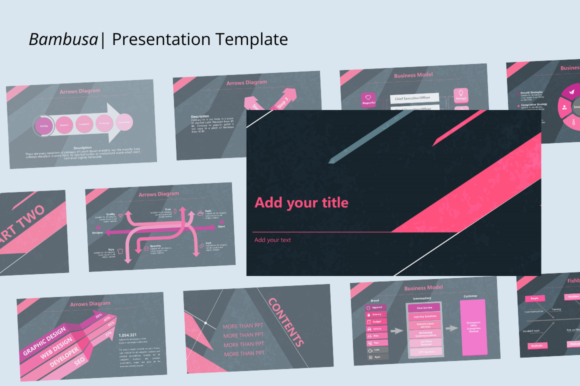
Created by Jowo Creative Project, Bambusa is a presentation template designed for people who need versatility without spending hours on layout decisions. It ships with 27 slides, a 16:9 widescreen ratio, and a structure that works across surprisingly different contexts—business pitches, company profiles, creative agency portfolios, school projects, photography showcases, and more. The template arrives as a PPTX or PPT file, includes a documentation file for guidance, and even throws in a random icon vector pack, which is a nice touch for anyone who wants to maintain visual consistency without hunting for assets elsewhere.
What sets it apart from the dozens of generic templates floating around marketplaces is how deliberately it's built for real-world use. Every graphic element—images, shapes, fonts, colors—can be resized and customized. That matters more than people realize. A template that locks you into rigid proportions or pre-set color schemes creates friction. You end up spending time fighting the tool instead of refining your message. Bambusa avoids that by making drag-and-drop functionality the baseline expectation rather than a premium feature.
Why Presentation Design Still Matters More Than You Think
There's a persistent myth that content alone carries a presentation. Tell a great story, and the slides don't matter. That's partially true—a compelling narrative will always outperform a beautiful but empty deck. But research consistently shows that visual design directly impacts how audiences process and retain information. A cluttered slide with mismatched fonts and off-brand colors creates cognitive load. People spend mental energy trying to parse the layout instead of absorbing your point. Clean, intentional design removes that friction.
Think about the last time you sat through a presentation where every slide looked like it came from a different template. Maybe someone grabbed free slides from three different sources and cobbled them together. The inconsistency is distracting, even if you can't articulate exactly why. Visual coherence—consistent typography, a unified color palette, aligned spacing—signals professionalism. It tells your audience that you care about details, which implicitly suggests you care about the quality of your work, too.
For small business owners pitching to investors or potential partners, this isn't superficial. A polished deck can be the difference between someone taking your business seriously and someone mentally checking out before you reach slide four. For creative agencies, the presentation itself becomes a portfolio piece. If you can't design your own pitch deck well, why would a client trust you with their brand identity?
Practical Scenarios Where a Template Like This Earns Its Keep
Consider a freelance photographer putting together a client proposal. You need to showcase your best work, outline your packages, explain your process, and close with a call to action. Building that from scratch in PowerPoint means deciding on layouts, font sizes, image placement, and color schemes—decisions that can eat an entire afternoon. With a template like Bambusa, you're working within a pre-established structure that already looks intentional. You drag your images into placeholder frames, adjust the text to match your brand voice, and you have a deliverable in under an hour.
Or take a school project. Students often underestimate how much presentation quality affects grading. Teachers notice when a deck looks cohesive versus when it looks like a last-minute scramble. The 20-plus slide count in Bambusa gives enough room for a thorough presentation without forcing students to cram information into too few slides or pad out too many.
For marketing teams, the use case is even more concrete. Quarterly reports, campaign recaps, product launches—these all demand decks that communicate data clearly while maintaining brand standards. The ability to modify shapes and charts directly within the template means you're not just dropping screenshots of analytics into blank slides. You're integrating data into a visual framework that supports your narrative.
Getting the Most Out of the Template's Flexibility
The real value of any presentation template reveals itself in the editing process. Bambusa's claim that everything is easily editable holds up, but there are a few practical tips worth keeping in mind to actually maximize that flexibility.
First, establish your color palette before you start editing. Open the template, look at the default color scheme, and decide right away which elements you want to keep and which need to change. Swapping colors across 27 slides is straightforward when you do it systematically—changing the theme colors in PowerPoint will cascade those changes through most elements automatically. But if you start editing slides individually without a plan, you'll end up with inconsistencies that defeat the purpose of using a template.
Second, pay attention to the image placeholders. The template is designed so pictures can be inserted with a single click, which is genuinely convenient. But the quality of your final presentation depends entirely on the images you choose. Low-resolution photos or generic stock images will undermine even the best-designed slide. Take the time to source high-quality images that actually represent your brand or topic. If you're using this for a company profile, professional team photos and candid workplace shots perform far better than staged stock imagery.
Third, don't feel obligated to use all 27 slides. A common mistake with feature-rich templates is treating every slide as mandatory. If your presentation only needs twelve slides, use twelve. Delete the rest. A focused, well-paced deck always outperforms a bloated one, regardless of how polished each individual slide looks.
Matching Visual Style to Your Actual Goals
One thing worth thinking about before committing to any template is whether its visual personality aligns with what you're communicating. Bambusa's design leans modern and clean, which makes it a strong fit for contemporary brands, tech companies, creative agencies, and educational contexts. If your brand identity skews more traditional or ornate—say, a luxury heritage brand or a formal legal practice—you might need to do more customization to make the template feel right.
This is where the editable shapes and customizable graphics become essential rather than just convenient. You can soften or sharpen the visual tone by adjusting geometric elements, swapping accent colors, and choosing fonts that better reflect your brand's voice. The template gives you a structural foundation. Your brand assets give it personality.
Font pairing deserves particular attention here. While the template comes with its own typography choices, most professionals will want to substitute their brand's typefaces. If your brand uses a serif font for headings and a sans serif for body text, apply that same hierarchy within the presentation. Consistency between your presentation and your other brand touchpoints—website, business cards, social media—reinforces recognition. People might not consciously notice that the fonts match, but the cumulative effect builds familiarity and trust.
The drag-and-drop simplicity also means you can experiment quickly. Try three different header treatments on a single slide. Duplicate a slide and test two different image layouts side by side. Because the template handles the structural heavy lifting, you have more mental bandwidth for creative decisions that actually differentiate your presentation.
A Tool That Respects Your Time
At the end of the day, what makes a presentation template worth using isn't the number of slides or the list of features. It's whether the tool saves you time without sacrificing quality. Bambusa does this well. The documentation file means you're not guessing at how to customize elements. The icon vector pack gives you a starting point for visual accents. The 16:9 ratio matches modern display standards, so you're not dealing with awkward black bars during a screen share or at a conference.
For anyone who regularly creates presentations—whether you're a founder building pitch decks, a teacher preparing lectures, a freelancer showcasing work, or a marketer reporting results—having a reliable template in your toolkit is genuinely practical. It won't replace design skill or strategic thinking, but it removes the mechanical barriers between your ideas and a polished final product. And sometimes, that's exactly what you need to move forward.